Documentation
·Live on the Atlassian MarketplaceForge AppCATAAM Jira Integration
Two-way sync between the CATAAM Security Platform and Jira — automatically create Jira issues from iASM findings and compliance failures, and push status changes back to CATAAM in real time.
5 min
Sync interval
Atlassian Forge
Delivery model
Node.js 22
Runtime
ID mappings only
Data stored
How it works
The CATAAM Jira app is a Forge application that runs entirely inside Atlassian's cloud infrastructure. It connects your CATAAM organisation to a Jira project and keeps both systems in sync automatically — no webhooks to host, no servers to manage.
CATAAM → Jira (automated)
| Trigger in CATAAM | Action in Jira |
|---|---|
| New iASM finding (OPEN) | Creates a Bug with severity, description, remediation, compliance controls, MITRE technique, and asset info |
| New compliance test failure (FAIL) | Creates a Bug tagged with the framework and control |
| Finding resolved in CATAAM | Transitions the linked issue to Done |
| Finding reopened in CATAAM | Reopens the issue with a comment |
Jira → CATAAM (real-time)
| Change in Jira | Action in CATAAM |
|---|---|
| Issue status → Done | Finding status → RESOLVED; triggers compliance test re-run for audit findings |
| Issue status → In Progress | Finding status → ACKNOWLEDGED |
| Issue status → Won't Do | Finding status → FALSE_POSITIVE |
| Due date updated | dueDate synced to CATAAM finding |
| Assignee changed | assignedTo synced to CATAAM finding |
Compliance re-run on resolution
When a Jira issue linked to a compliance audit test is marked Done, the Forge app automatically reruns the test on the CATAAM platform. If the test still fails:
- The Jira issue is automatically reopened
- The failure logs are posted as a comment on the issue
- The CATAAM finding status is reset to
OPEN
This prevents compliance drift: a finding cannot stay resolved in your ticket tracker if the underlying control still fails in production.
Admin configuration
After installing the app from the Atlassian Marketplace, open the settings page at Jira Settings → Apps → CATAAM Integration. You will see three configuration sections.
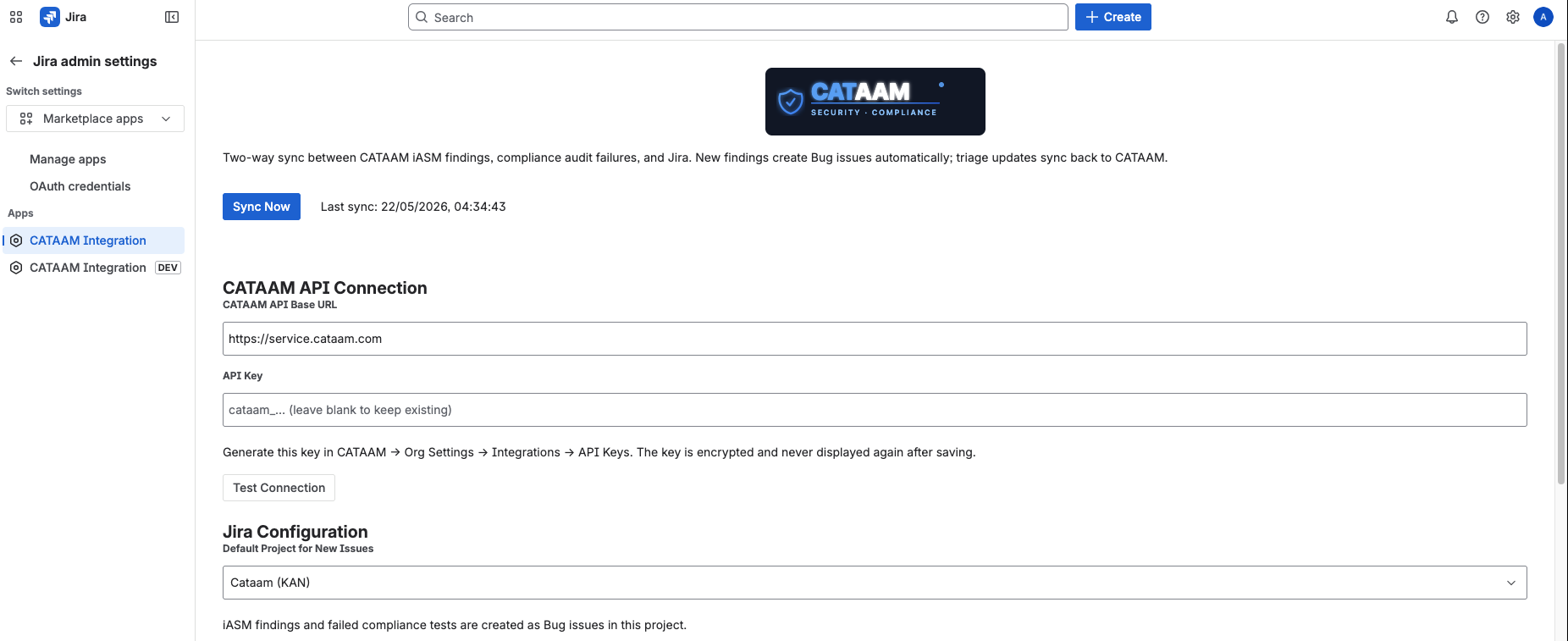
Jira Settings → Apps → CATAAM Integration
1 · CATAAM API Connection
Authenticates the Forge app with your CATAAM organisation.
The base URL of the CATAAM backend service. Leave as https://service.cataam.com unless you are on a private deployment.
A cataam_…-prefixed key generated in CATAAM at Org Settings → Integrations → API Keys.
The key is stored in Forge encrypted secret storage and is never displayed again after saving. Leave the field blank on subsequent saves to keep the existing key.
Verifies the base URL and API key before saving. A green Connected ✓ badge confirms the Forge app can reach the CATAAM API. Fix any errors before proceeding.
2 · Jira Configuration
Controls where new issues land inside your Jira site.
The Jira project where iASM findings and failed compliance tests are created as Bug issues. The dropdown lists every project your Jira site admin account can access.
Choose a project your security or engineering team already triages — new issues appear there immediately after the next sync.
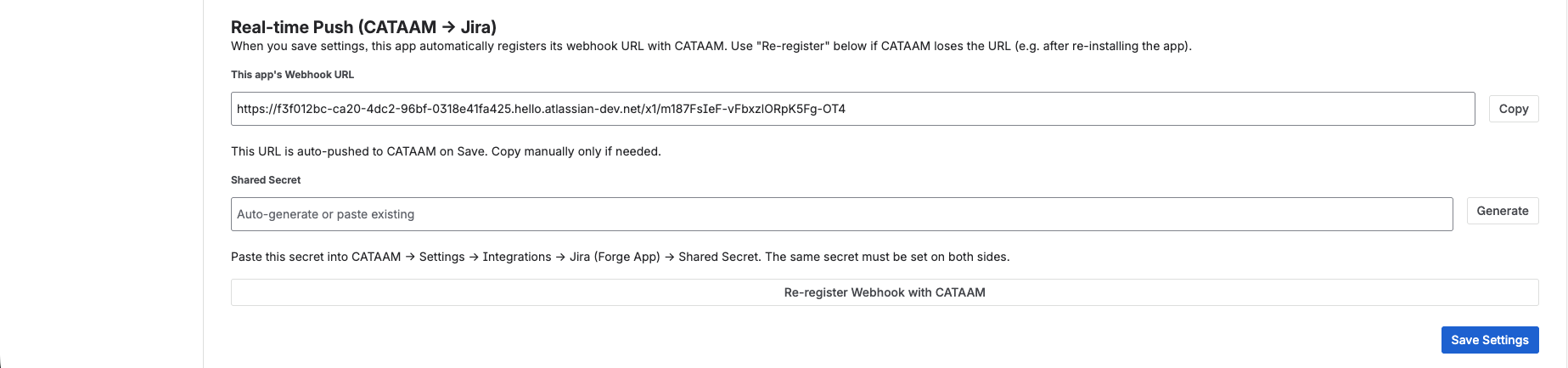
Real-time Push section — webhook URL and shared secret
3 · Real-time Push (CATAAM → Jira)
Enables CATAAM to push finding events to Jira instantly, in addition to the scheduled 5-minute poll. Both channels must be configured for full real-time behaviour.
A read-only Atlassian-hosted URL that CATAAM calls to deliver push events. It is generated automatically by Forge and registered with CATAAM when you click Save Settings.
Use the Copy button only if you need to paste it into CATAAM manually (e.g. after re-installing the app).
An HMAC secret that CATAAM and the Forge app use to authenticate each webhook delivery. Click Generate to create a cryptographically random secret — copy it immediately, as it is shown only once.
After generating, paste the same secret into CATAAM → Settings → Integrations → Jira (Forge App) → Shared Secret. Both sides must match or webhook deliveries will be rejected.
Pushes the current Webhook URL to CATAAM without changing any other settings. Use this if CATAAM loses the URL — for example after uninstalling and reinstalling the app.
4 · CATAAM platform settings
The corresponding settings inside CATAAM at Settings → Integrations → Jira (Forge App).
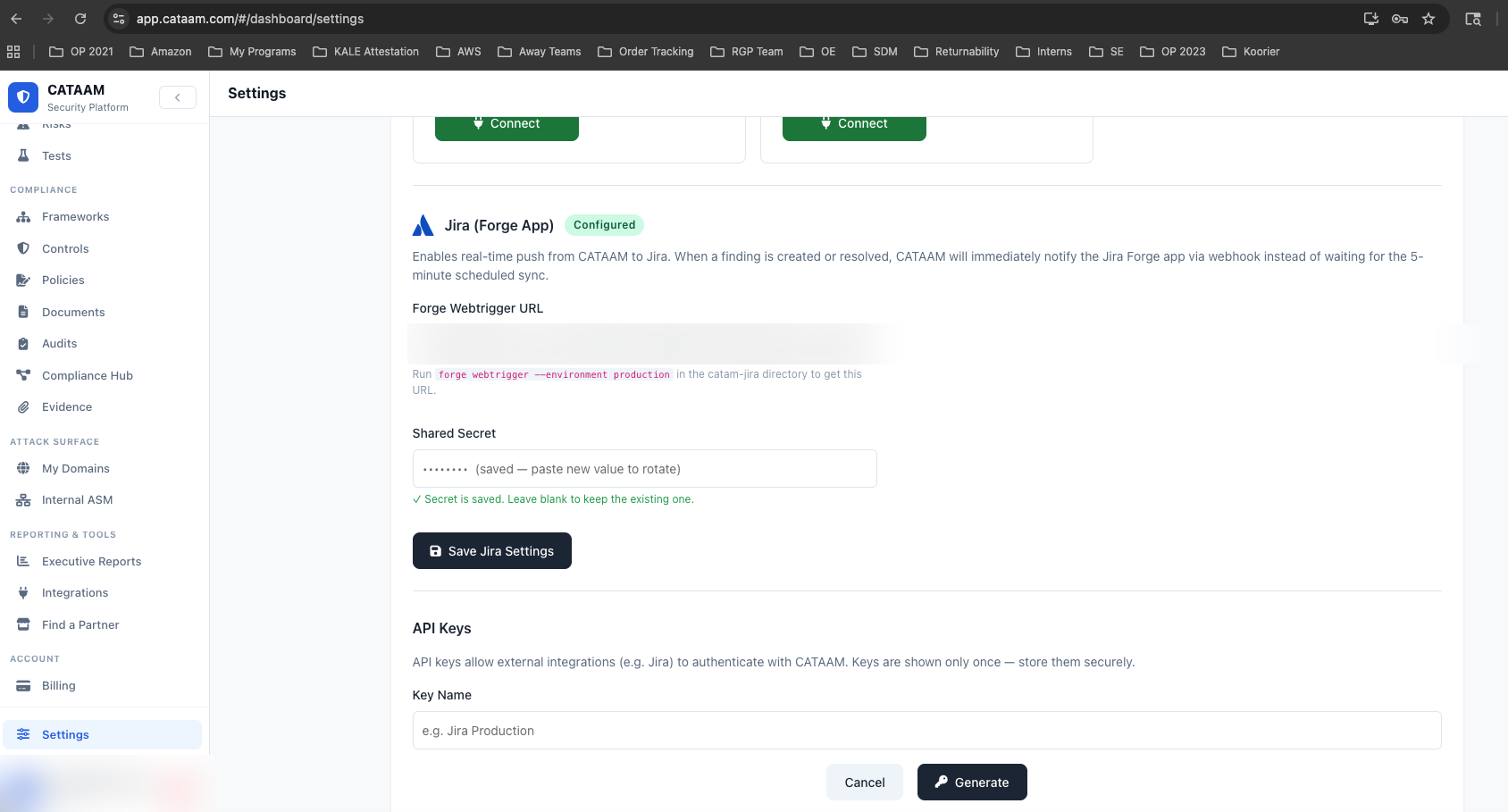
CATAAM app · Settings → Integrations → Jira (Forge App)
Auto-populated when you click Save Settings in the Jira app. CATAAM stores this URL and calls it whenever a finding is created or resolved, enabling real-time push instead of waiting for the 5-minute scheduled sync.
If the field is empty, click Re-register Webhook with CATAAM in the Jira app settings to push the URL again.
Paste the secret you generated in the Jira app here. Both sides must hold the same value — CATAAM uses it to verify that incoming webhook calls are genuinely from the Forge app.
Create a dedicated API key for the Jira integration here. Give it a descriptive name (e.g. Jira Production) so it is easy to identify and rotate independently of other integrations.
Generating a CATAAM API key
Org admins manage keys at Org Settings → Integrations → API Keys inside CATAAM. Keys are stored as SHA-256 hashes — the raw cataam_-prefixed key is shown exactly once at creation, so copy it before closing the dialog.
| Action | How |
|---|---|
| Create a key | Org Settings → Integrations → API Keys → Generate New Key |
| Revoke a key | Click the delete icon next to the key in the same list |
| Rotate a key | Generate a new key, update the Jira app settings, then revoke the old key |
Atlassian Marketplace compliance
OAuth scopes
- ✓
read:jira-work - ✓
write:jira-work - ✓
read:jira-user - ✓
manage:jira-configuration - ✓
storage:app
External fetch allowlist
- ✓
https://service.cataam.com - ✓
https://app.cataam.com
Secret storage
- ✓
API key in Forge encrypted storage - ✓
Webhook secret in Forge encrypted storage - ✓
No plaintext credentials at rest
Data policy
- ✓
No customer finding content stored - ✓
Only ID-to-ID mappings in Forge Storage - ✓
Inbound webhooks validated with HMAC shared secret
Ready to connect CATAAM to Jira?
Install from the Atlassian Marketplace or get started with a CATAAM account.
WATCH
See the Jira integration in action
Auto-create and two-way-sync Jira issues from iASM findings and failed compliance tests.